GPIO issue on my UP Squared Pro 7000

Hi everyone,
I'm hoping someone can help me out with a GPIO issue on my UP Squared Pro 7000.
My board is the UPX-MTL01 running Windows 11 IoT Enterprise LTSC with UP Framework V24.09.10 (latest).
Here's my situation:
I have a button wired between physical pin 15 (GPIO6) and physical pin 14 (GND) on the 40-pin HAT. I've confirmed with a multimeter that the wiring is correct — the pin reads 3.3V normally and drops to 0V when I press the button or short it to GND with a jumper wire. So electrically everything is working perfectly.
However, when I read the pin in software using the UpNetGpioTestTool it always shows High — even while the pin is physically shorted to GND.
My questions:
1. Has anyone experienced GPIO input pins being stuck High on the UPX-MTL01 specifically under Windows 11 IoT?
2. Is there a specific BIOS setting required beyond just setting the pin to Input mode for interrupts/input detection to work?
3. Could there be a pull-up resistor active at the driver level that is overriding the physical voltage change?
4. Is GPIO6 known to have any limitations or special configuration requirements on this board?
For reference, here is what I have already tried:
- BIOS set to Input for GPIO6 ✓
- Multimeter confirms pin voltage changes on button press ✓
- Tested with both read and irq commands in UpNetGpioTestTool ✓
- Tried SharedReadOnly and Exclusive pin sharing modes in code ✓
- Clean reinstall of UP Framework V24.09.10 ✓
- Running as Administrator ✓
Any help or pointers would be really appreciated. Thanks!
Answers
-
Hi @fahmidk
The HAT40 pin definition is different between BIOS and OS.
Please refer to the link and mapping image below after installing the driver on the OS.
Link: https://github.com/up-board/up-community/wiki/40Pin-Header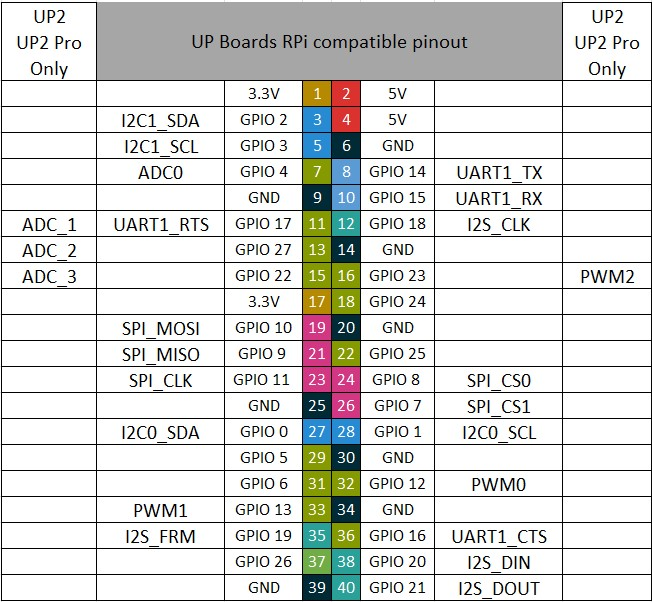
Best Regards,
Harry Chiu