UEFI Update from linux instead of EFI Shell

Hello,
is there a way to push an UEFI bios update from linux (i.e. ubuntu 22.04 LTS) instead of EFI shell?
We tested the BIOS update process with the EFI Shell and an startup.nsh to automatically update the bios from an USB stick. This requires physical access and manual inputs to the board.
We do not have physical access to the boards and can not plug in an USB memory stick and go through the bios boot selection menu at the customers place and need to update the bios on those systems.
Thanks in advance,
Farril
Best Answer

Answers
-
Hello Harry Chiu,
I wasn't aware of that document, but i think this is a solution I can work with.
Thank you.
-
Hi @Farril
The shell file is attached to you; other files will be included in the BIOS file you download.
-
The update is now working and we implemented as part of an factory reset mechanism.
It works by placing the UPAPBM11 (or UPAPBM12) files into /boot/efi/EFI/SHELL and a startup.nsh into /boot/efi which gets executed after transfering the control flow to the EFI shell via 'efibootmgr -n 0001 && reboot'
This works fine now,
However we found an issue with the bios updates as they seem to kill the ethernet on board. It is no longer able to get into an UP state.
An external USB Ethenet adapter works fine however.ip a:
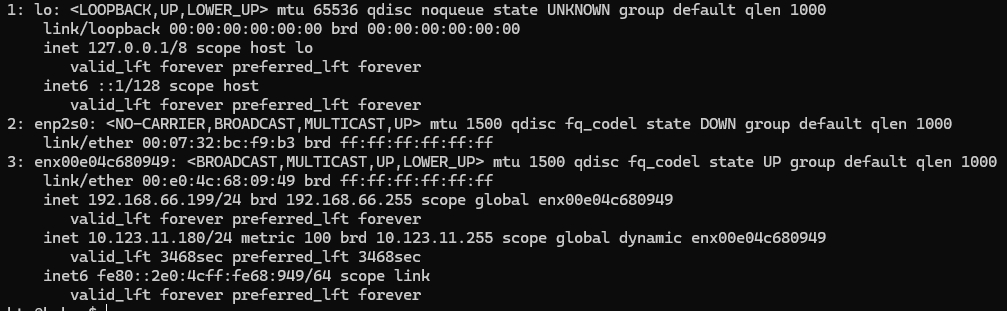
There has nothing changed but the BIOS update to UPAPBM11 downloaded from the support page.
Is there any known issue regarding eth and the update?
How do I get the bios version the devices are delivered with?Thanks in advance
-
I need to update this:
UPAPBM11 is affected, UPAPBM12 is not.UPAPBM11 is available on the website, 12 only in this forum.
-
Hi @Farril
The R1.2 BIOS version can be downloaded from the official website.
https://www.aaeon.com/tw/product/detail/up-developer-board-intel-apollo-lake-up-4000/downloadThere are no LAN-related fixes in either of these BIOS versions, so I believe the LAN should not be affected. Therefore, I need to try to reproduce this issue on our side.
Could you please share your steps with me???
Best Regards,
Harry Chiu -
Sure,
it's basically a vanilla Ubuntu 22.04 Server running on the UP 4000 with a custom service (selfhosted .net10 ASP) running in the background controlling the serial port and accumulating data that is provided via Web and SNMP.
The service runs as a normal, non-root user.
This is an OEM product and the service has a customized look for each OEM licencee. And one of them objected to the "UP bridge the gap" logo at startup (allthough in normal use, there is no monitor connected)
So I began with updating the vanilla BIOS first and then changed the logo.bmp within the EFI images. This is just to explain to why we want to do a EFI update, the issue is also present with the stock UPAPBM11.
When the EFI BIOS shall be updated a script "update.sh" is run with normal, non-root rights which executes updateSteps.sh with root rights via sudo. (Right now with password, sudoers.d entry to skip the password for this is wip)
updateSteps.sh then prepares the /boot/efi folder to execute the update on the next efi shell boot. After that efibootmgr is invoked to activate the efi shell on the next boot and a reboot is executed.After the update is done, the startup.nsh issues a reset and the system returns to run normally.
Using the vanilla UPAPBM11 results in the internal ethernet (enp2s0 in ubuntu 22.04) not beeing able to get UP, while everything works fine with vanilla UPAPBM12.
I even modified tha logo.bmp entry in the efi image for the UPAPBM12 and it still works a charm.See the OEM folder attached with the script that is used to execute the firmare update to 11 (I just redacted the OEM/company names)
Thanks,
Farril -
On a side-note: the other side of the ethernet link in our test environment is an old CISCO Catalyst 2950.
-
Hi @Farril
I followed the steps you provided, but I couldn't reproduce the problem you encountered.
I'm not sure why; the only difference between us might be our operating systems.
Best Regards,
Harry Chiu